
All your windows and tabs as one tree.
Tab-Bat keeps them when you close them: a closed window stays in the tree and opens again with a click. A browser extension for Chrome and Firefox, open source.
In short
- Close and keepsaved windows · archive · undo
Closed windows stay as saved windows or in the archive. Undo for almost everything, and automatic backups.
- Your data stays yoursno account · no analytics
Without a storage location everything stays in the browser. Nothing goes to the developer.
- Sync without an accountfolder · WebDAV · Tab-Bat server
Through a storage location you choose, end-to-end encrypted, also between Chrome and Firefox.
- Private windows stay privatenever stored
They show in the tree while they are open and are never stored, unless you keep one in a list.
- Open source and freeAGPL-3.0-or-later
For Chrome and Firefox, in English and German.
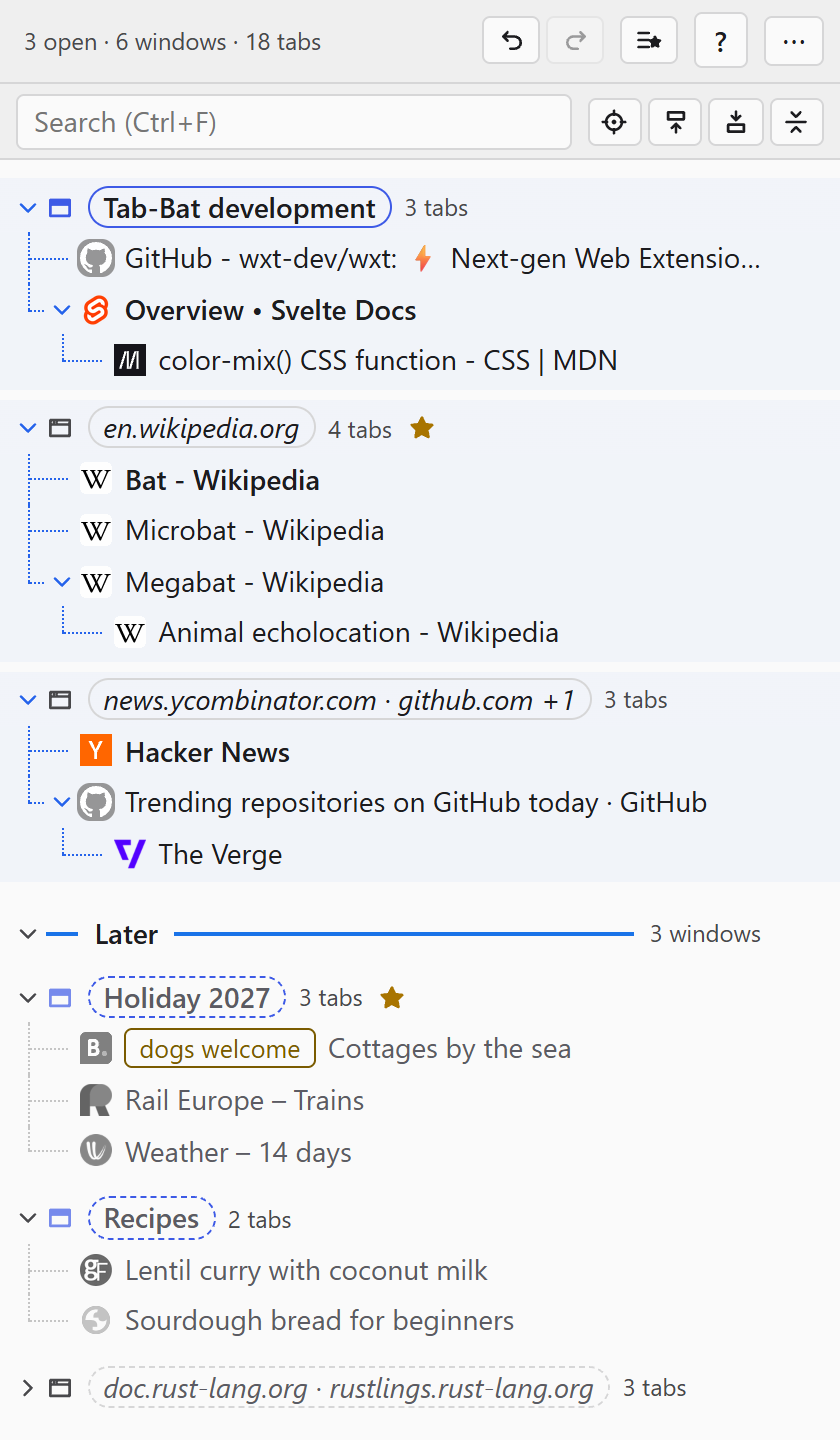
What it does
Tab-Bat shows all your browser windows and their tabs as one tree, in a window of its own.
The tree
- Windows and tabs, tabs nested below the tab they came from
- Notes, separators and sections
- The browser’s tab groups
Close and keep
- A closed window stays in the tree
- Named windows stay as saved windows, unnamed ones go to the archive for a while
- A click opens them again, as a whole or tab by tab
Lists
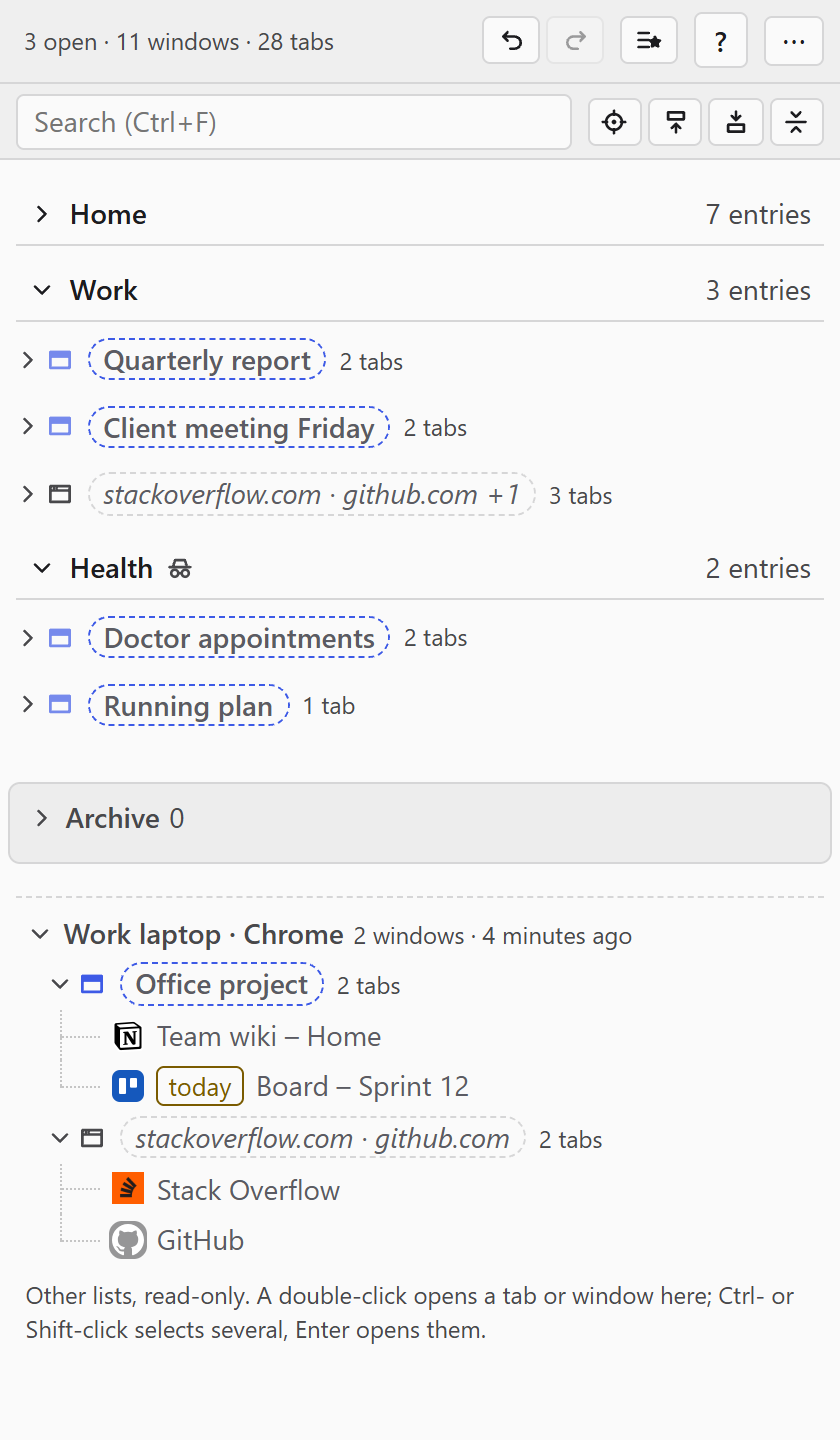
- Windows belong to lists, for example “Work” and “Home”
- Each device chooses which lists it loads
Finding things
- Search in the tree, and from the address bar with the keyword “tb”
- Favorites and a quick list (Alt+Shift+F)
- If you switch it on, search in the text of the pages you load (off by default; the text stays on your device)
Working with it
- Keyboard shortcuts for almost everything, undo and redo
- The tree in the browser’s side panel
- Docking: the Tab-Bat window at the edge of the screen, browser windows next to it (Chrome only)
- Built for large trees with hundreds of windows and thousands of tabs
Safety net
- Automatic backups
- Export and import, also of bookmark files
- A backup into the download folder if you want one
Privacy
Without a storage location everything stays in the browser; with one, your lists go, end-to-end encrypted by default, only to the place you set up. Nothing goes to the developer, no analytics.
There is no account, no server of the developer, no tracking and no advertising. Like the browser itself, the tree may load a tab’s icon from the tab’s website.
What is stored where, and what a storage location can still see
Sync and storage locations
A storage location you choose keeps your lists outside the browser and syncs them between your devices, also between Chrome and Firefox. It can be:
- A folder that your cloud’s program syncs: OneDrive, Dropbox, Google Drive, Nextcloud, Syncthing … (Chrome only)
- A WebDAV server
- A Tab-Bat server you run yourself
Everything is encrypted on your device with a key only your devices have.
Download
Tab-Bat is not in the stores yet. The links appear here as soon as the listings exist.
Tab-Bat runs in the current Chrome and in Firefox 140 or newer. Other Chromium browsers such as Edge, Brave and Vivaldi run the Chrome version and should work, but are not tested.
Only these two listings and the releases of the repository are Tab-Bat.
Coming from Tabs Outliner
Tab-Bat is inspired by Tabs Outliner, which has shown windows and tabs as a tree for many years. It is an independent program without any code from it and has no affiliation with its developer.
Tab-Bat imports Tabs Outliner exports (menu ⋯ → Import): groups become sections, and notes, separators and nesting come along. An import only adds saved windows; nothing is overwritten.
Open source
Tab-Bat is free software under the GNU Affero General Public License (AGPL-3.0-or-later).
Source code, questions and bug reports: Tab-Bat on GitHub
Tab-Bat is made by one maintainer together with Claude, an AI model by Anthropic.